NOW AVAILABLE! Launch your AI-as-a-service business with Hatz Activate!
Learn more
NOW AVAILABLE! Launch your AI-as-a-service business with Hatz Activate!
Learn more
NOW AVAILABLE! Launch your AI-as-a-service business with Hatz Activate!
Learn more
Don’t Take the Bentley to the Bodega: A Smarter Approach to AI Model Cost Optimization
Don’t Take the Bentley to the Bodega: A Smarter Approach to AI Model Cost Optimization
Matt Hamilton

Most people default to the most powerful model available, and it makes intuitive sense. Use a more capable model, get better output. But that's not always the case — and when it comes to AI model costs, it could be costing you more than you realize.
The Complexity Mismatch of AI Models
LLMs aren’t one-size-fits-all. A frontier model can reason through genuinely hard problems — complex synthesis, multi-step chains, ambiguous instructions. A lighter model handles clear, structured tasks fast and cheaply. The output is often indistinguishable.
The problem is that most AI usage isn’t concentrated at the hard end. When we looked at the prompts coming through our Auto Model mode, almost 75% fell into the low-to-medium complexity range. Summarizing, extracting, reformatting, answering straightforward questions. Tasks that don’t need such a high ceiling.
Running all of those through your most powerful model is like taking a Bentley to the bodega. It gets you there, but it’s also overkill.
What is Auto Mode? Auto mode routes each prompt to the right model based on what it actually needs, and your cost constraints. Three tiers:
Lite — fast and low-cost, for structured tasks with low ambiguity
Performance — the default, best balance of quality and cost
Turbo — full power, for tasks that genuinely need it
The cost differences are significant:
Performance uses 3.6x fewer credits than Turbo
Lite uses 3.5x fewer credits than Performance — or about 12.6x fewer credits than Turbo
The Real Cost Savings on Auto Mode
Say your team runs 1,000 prompts a day and you’re currently on Turbo for everything. If half of those are low-to-medium complexity, you could shift them to Performance without any meaningful quality difference. That’s 500 prompts at 3.6x the efficiency. Your effective daily credit burn drops by roughly 40-50% overnight.
Push those same prompts to Lite and the savings are steeper. At 12.6x fewer credits than Turbo, a task that costs 126 credits on Turbo costs 10 on Lite. For high-volume, repetitive workflows — document extraction, classification, structured formatting — that gap is hard to ignore.
Flip it around: if you’re on a fixed credit budget, auto mode is effectively a multiplier. The same budget that runs 1,000 Turbo prompts runs roughly 3,600 on Performance, or 12,600 on Lite. That’s not a rounding error. That’s the difference between hitting your limit mid-month and having headroom to actually scale.
Why Frontier Models Cost More (And When It’s Worth It)
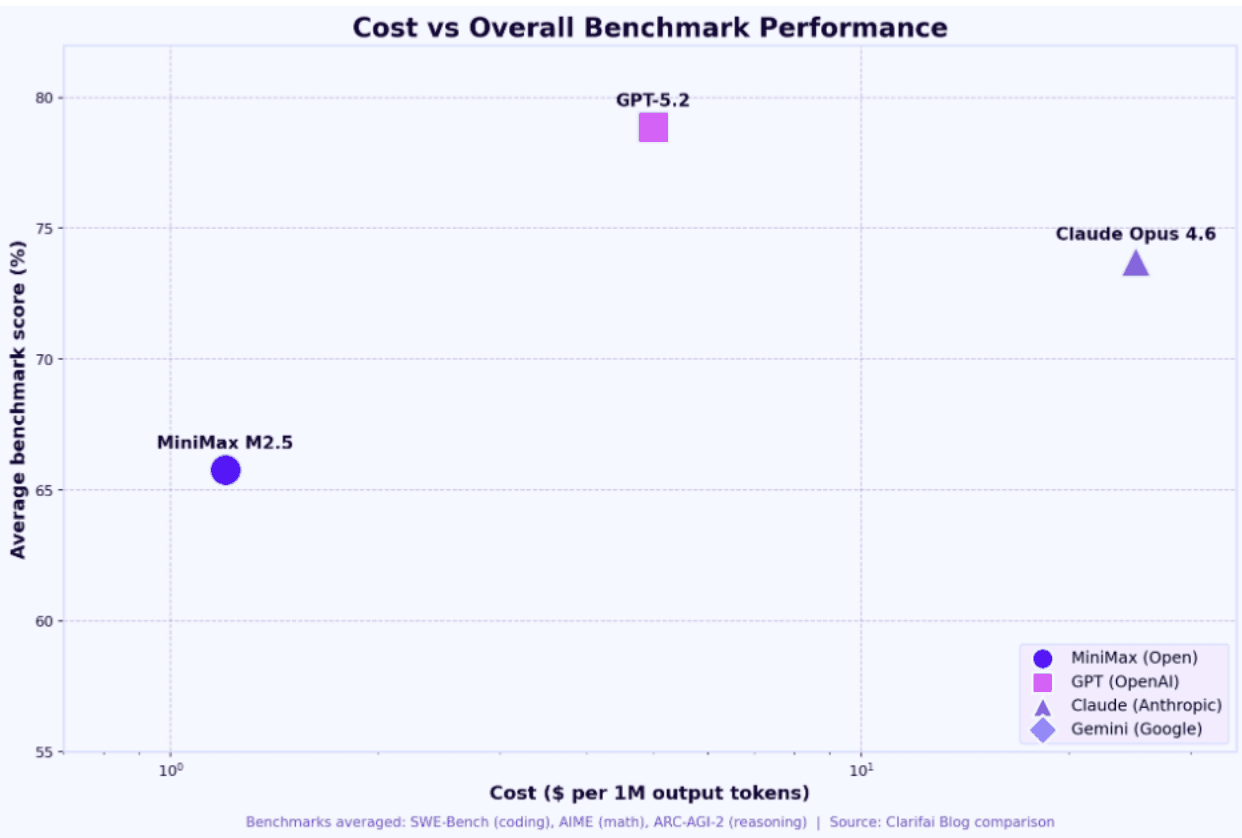
Larger models require more compute per inference — more parameters, more work, more cost. That overhead is worth it when the task demands deep reasoning. It’s waste when the task is straightforward. A lighter model has a narrower capability envelope, but for the right tasks that ceiling is never touched. The output quality holds. The task gets done. You just spent a fraction of the credits, and these models have gotten better and better over the past year.
How to Choose the Right Model
If you’re using auto mode, the routing is handled automatically. You don’t need to think about it prompt-by-prompt.
That said, it’s worth knowing your options:
Performance is the right default for most workflows. It handles the majority of real-world tasks well at a fraction of Turbo’s cost.
Turbo is there for the tasks that actually warrant it — deep analysis, complex reasoning, things where you need the ceiling.
Lite is worth evaluating for high-volume, lower-complexity workflows. The math gets compelling fast.
The goal isn’t to use the cheapest model for everything. It’s to stop using the most expensive one for everything.
Results may vary based on your prompt mix. These estimates were calculated using our current blend of prompt complexity across the platform.
Written by Matt Hamilton, Head of Engineering, Hatz AI
Don’t Take the Bentley to the Bodega: A Smarter Approach to AI Model Cost Optimization
Matt Hamilton
Most people default to the most powerful model available, and it makes intuitive sense. Use a more capable model, get better output. But that's not always the case — and when it comes to AI model costs, it could be costing you more than you realize.
The Complexity Mismatch of AI Models
LLMs aren’t one-size-fits-all. A frontier model can reason through genuinely hard problems — complex synthesis, multi-step chains, ambiguous instructions. A lighter model handles clear, structured tasks fast and cheaply. The output is often indistinguishable.
The problem is that most AI usage isn’t concentrated at the hard end. When we looked at the prompts coming through our Auto Model mode, almost 75% fell into the low-to-medium complexity range. Summarizing, extracting, reformatting, answering straightforward questions. Tasks that don’t need such a high ceiling.
Running all of those through your most powerful model is like taking a Bentley to the bodega. It gets you there, but it’s also overkill.
What is Auto Mode? Auto mode routes each prompt to the right model based on what it actually needs, and your cost constraints. Three tiers:
Lite — fast and low-cost, for structured tasks with low ambiguity
Performance — the default, best balance of quality and cost
Turbo — full power, for tasks that genuinely need it
The cost differences are significant:
Performance uses 3.6x fewer credits than Turbo
Lite uses 3.5x fewer credits than Performance — or about 12.6x fewer credits than Turbo
The Real Cost Savings on Auto Mode
Say your team runs 1,000 prompts a day and you’re currently on Turbo for everything. If half of those are low-to-medium complexity, you could shift them to Performance without any meaningful quality difference. That’s 500 prompts at 3.6x the efficiency. Your effective daily credit burn drops by roughly 40-50% overnight.
Push those same prompts to Lite and the savings are steeper. At 12.6x fewer credits than Turbo, a task that costs 126 credits on Turbo costs 10 on Lite. For high-volume, repetitive workflows — document extraction, classification, structured formatting — that gap is hard to ignore.
Flip it around: if you’re on a fixed credit budget, auto mode is effectively a multiplier. The same budget that runs 1,000 Turbo prompts runs roughly 3,600 on Performance, or 12,600 on Lite. That’s not a rounding error. That’s the difference between hitting your limit mid-month and having headroom to actually scale.
Why Frontier Models Cost More (And When It’s Worth It)
Larger models require more compute per inference — more parameters, more work, more cost. That overhead is worth it when the task demands deep reasoning. It’s waste when the task is straightforward. A lighter model has a narrower capability envelope, but for the right tasks that ceiling is never touched. The output quality holds. The task gets done. You just spent a fraction of the credits, and these models have gotten better and better over the past year.
How to Choose the Right Model
If you’re using auto mode, the routing is handled automatically. You don’t need to think about it prompt-by-prompt.
That said, it’s worth knowing your options:
Performance is the right default for most workflows. It handles the majority of real-world tasks well at a fraction of Turbo’s cost.
Turbo is there for the tasks that actually warrant it — deep analysis, complex reasoning, things where you need the ceiling.
Lite is worth evaluating for high-volume, lower-complexity workflows. The math gets compelling fast.
The goal isn’t to use the cheapest model for everything. It’s to stop using the most expensive one for everything.
Results may vary based on your prompt mix. These estimates were calculated using our current blend of prompt complexity across the platform.
Written by Matt Hamilton, Head of Engineering, Hatz AI
Get Started
Join Hatz and put AI to work for your team with faster workflows, smarter decisions, and complete control over your data. No compromises.
Get Started
Join Hatz and put AI to work for your team with faster workflows, smarter decisions, and complete control over your data. No compromises.
Get Started
Join Hatz and put AI to work for your team with faster workflows, smarter decisions, and complete control over your data. No compromises.